Model hubs such as Hugging Face let anyone try a model from its page. Model marketplaces list hundreds of fine-tuned and specialist models side by side. Short-video apps offer AI effects, each backed by a model of its own. These services host a long tail of models, and their traffic shows it. A model gets a burst of requests when someone opens its page or picks its effect, and it sits almost idle the rest of the time.
Autoscaling does not fit this pattern well. Without scale-to-zero, every model holds at least one GPU around the clock, mostly to wait. With scale-to-zero, the first request after a quiet spell waits for a cold start. The Pod has to be scheduled, the image pulled, the weights loaded, and the engine compiled and warmed up. That takes tens of seconds to minutes, which is too long for someone who just clicked ’try'.
GPU sharing is not a new idea. Time-slicing, NVIDIA MPS, MIG and vGPU all let several workloads use one GPU, and each makes a trade-off. Time-slicing makes processes take turns on the whole GPU, which costs context switches and leaves each process free to take memory that another needs. MPS runs kernels from several processes at once, but a fatal fault in one of them can take down the others on the same GPU. MIG gives each slice hardware isolation, but slices come in fixed sizes, only some GPUs support it, and changing the layout means draining the GPU. vGPU divides a GPU into fixed profiles for virtual machines. All of these work below the inference engine. They see processes and memory, not models, weights or KV cache, so all they can do is cut a GPU into slices. They cannot give an idle model’s KV cache to a busier neighbour, or move an idle model’s weights out of the way.
We believe GPU sharing for inference belongs one layer higher. Engines such as vLLM and SGLang have become standard infrastructure for serving models, and they know what their memory holds and when it is in use. Sharing that is built on top of the GPU and the engine can follow each model’s load, and we think it is the right approach for the long term.
We ran a stress test on one node with eight NVIDIA H20 GPUs and 39 models, from 1.5B to 32B. Each GPU hosted about five of the models, with about three awake at a time. A sleeping 8B model kept 1.7 to 3.2 GiB on its GPU, against about 15 GiB for its weights alone. Whenever its GPU had room, a sleeping model was serving again about 4 seconds after a request. This post explains how, and the Demo section shows a smaller run on one GPU step by step.
Introduction
ModelClaim builds on two open-source projects.
kvcached [1] makes the KV cache elastic. A vLLM engine normally reserves most of the GPU for its KV cache when it starts. With kvcached, GPU memory is mapped into an engine’s KV cache only as requests need it, so several engines can run on one GPU. kvcached is what makes it possible for models to share a GPU at all, and ModelClaim would not exist without it.
vLLM’s sleep mode [2] makes swapping fast. An idle engine can be put to sleep, which moves its weights to host memory and frees its KV cache. It can be woken in seconds when it is needed again, without a cold start.
Each project solves part of the problem, but nothing ties them together. Engines that share a GPU through kvcached each still expect most of it, and under load they compete for the same memory. Sleep frees memory, but something has to decide which model sleeps, who may use the memory it frees, and whether there will be room when it has to wake. Serving many models from a pool of GPUs needs a control plane that makes these decisions for every model on every GPU.
AIBrix ModelClaim is that control plane. It places each model on a GPU in the pool and keeps a ledger of what every model on that GPU has been promised, so that no memory is promised twice. It caps each engine’s KV cache at its share, and it decides when each model sleeps and when it wakes. The rest of this post walks through each of these in turn.
How ModelClaim Works
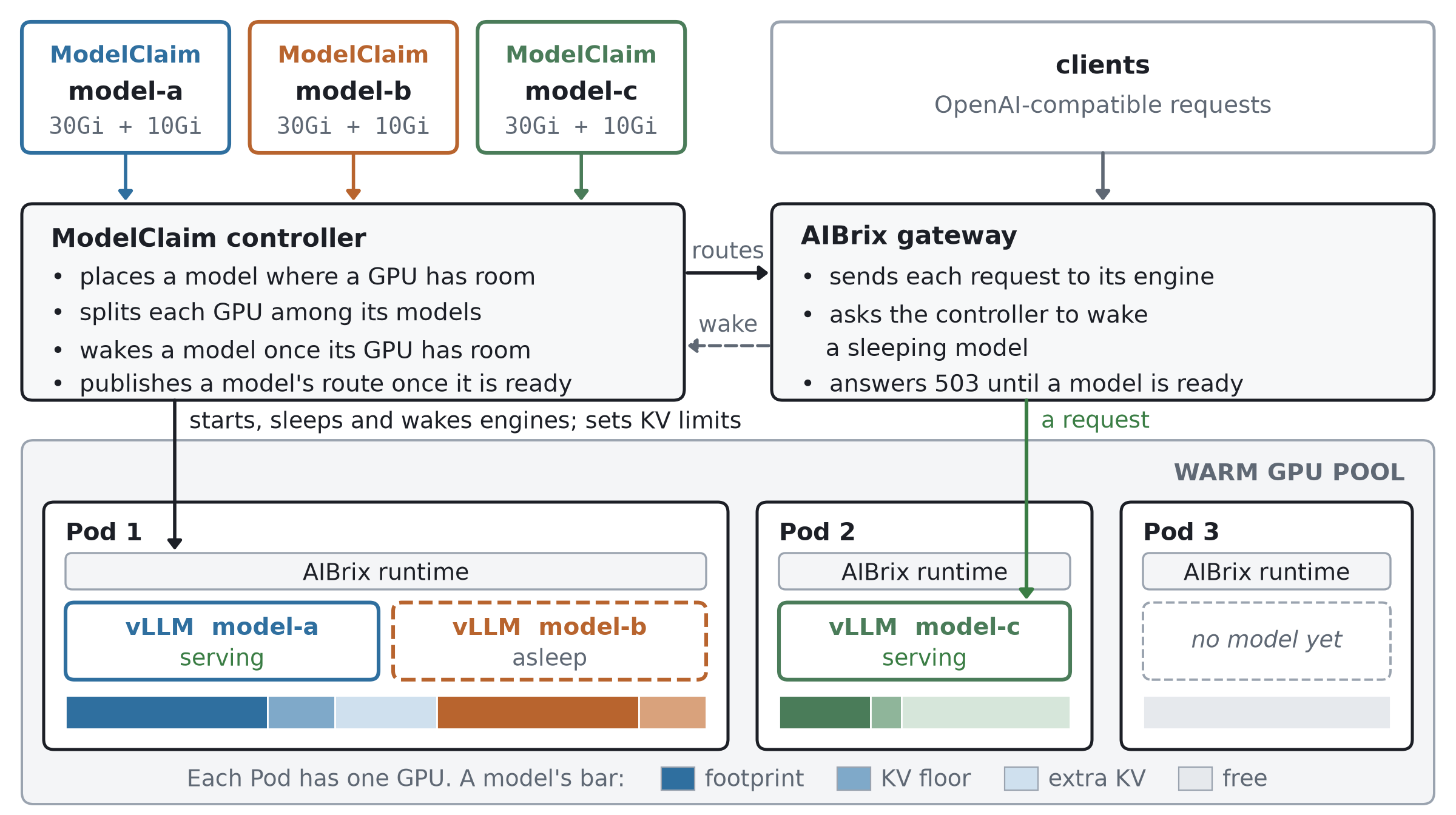
A warm pool is an ordinary Deployment of GPU Pods. Each Pod runs the AIBrix runtime and carries a label that names its pool. The Pods start ahead of time, with no model loaded.
A ModelClaim names one model to serve. It specifies where the weights are stored, which engine serves the model, which pool may host it, the engine arguments, and the GPU memory required by one instance. It does not request GPUs itself, since the pool owns them.
The ModelClaim controller picks a Pod for each claim and asks the runtime on that Pod to start an engine. Each engine is a separate process with its own KV cache, which kvcached manages on the shared GPU. When an engine crashes, the runtime restarts it, and the other engines on the Pod keep running. The controller also puts engines to sleep, wakes them, and sets their KV limits.
The AIBrix gateway routes OpenAI-compatible requests by model name to the engine that the controller has published for that model. While a model is starting, asleep, or waiting for room, the gateway returns HTTP 503 with a Retry-After header. When a request arrives for a sleeping model, the gateway asks the controller to wake it.
ModelClaim supports only vLLM, since SGLang needs additional integration. Each claim currently runs one engine.
The figures in this post show each model’s share of GPU memory in three shades of its own colour, as the table below explains.
| Shade | Term | Meaning |
|---|---|---|
| dark | footprint | the maximum memory a model may use outside its KV cache |
| middle | KV floor | the minimum KV cache a model needs to serve requests |
| light | extra KV | its share of spare GPU memory for KV cache, allocated according to load |
A model’s KV limit is the most KV cache its engine may use at the moment. It is what the engine already holds, at least its KV floor, plus its extra KV.
Sharing a GPU Without Overcommitting It
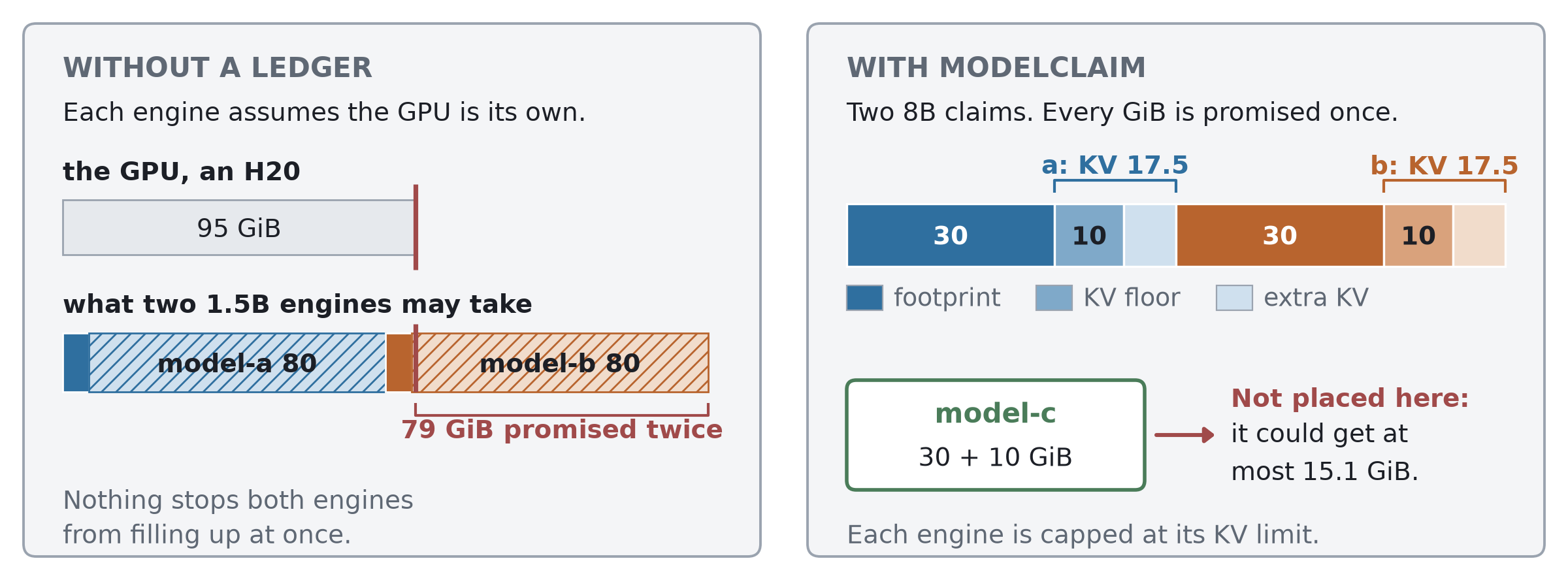
The left side of the figure shows what goes wrong when two 1.5B models share a GPU without a ledger. With kvcached, each engine starts with access to the full KV pool that vLLM sized, about 80 GiB on a 95 GiB GPU. Including their footprints, the two engines are entitled to 174 GiB between them. Nothing fails until both engines grow at once under load.
ModelClaim starts from a declaration. Each claim states the GPU memory required by one instance of the model:
spec:
  perGPU:
    maximumFootprint: 30Gi
    kvFloor: 10Gi
maximumFootprint is the model’s footprint, the most memory one instance may use outside its KV cache, such as its weights, CUDA graphs and workspaces. kvFloor is its KV floor, the least KV cache it needs to serve requests. Declaring more than a model needs is safe but wastes capacity, and declaring less is unsafe.
With these declarations, the controller keeps a ledger for every Pod. Each model has a reservation equal to its footprint plus its KV floor, and a new model is placed only where its reservation fits beside everyone else’s. The controller counts a model from the moment its claim is recorded, before its engine loads, so no memory is ever promised twice.
When no GPU has room, the claim waits and says why. On the right side of the figure, a third 8B claim needs 40 GiB. The GPU could give it at most 15.1 GiB even with both engines at their floors, and that is what the claim’s status reports.
Splitting Each GPU Among Its Models
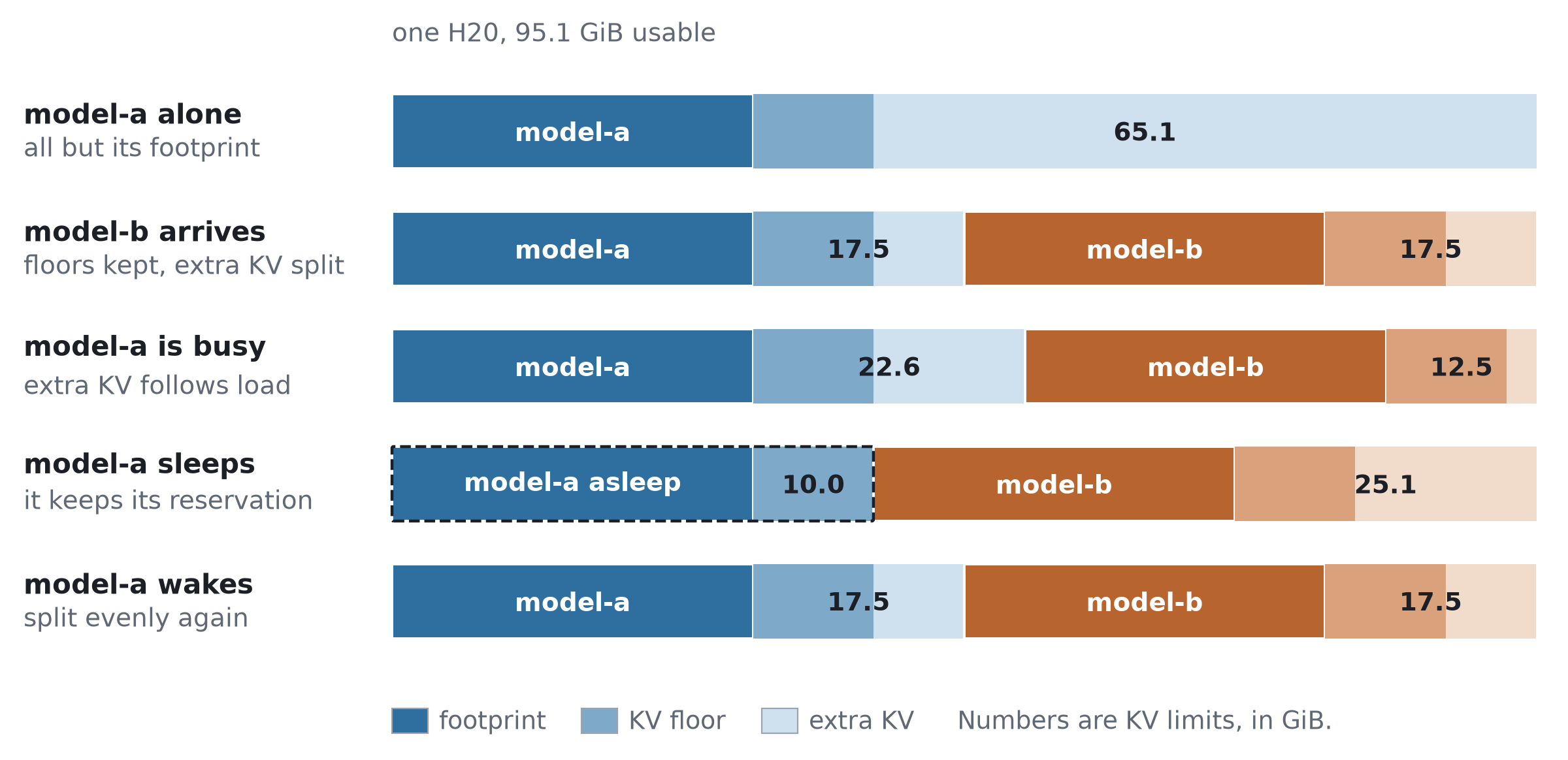
A ledger alone does not stop an engine from growing into a neighbour’s share. So the controller also caps each engine at a KV limit, and it calculates the limits for all engines on a GPU together. Each engine keeps the KV cache it already holds, and an awake engine keeps at least its floor. The rest of the GPU is shared out by demand, so a busy engine gets more extra KV than an idle one, and a sleeping engine gets none. Together, the footprints and limits on a GPU never exceed its capacity and normally account for all of it. The controller recalculates them about every 10 seconds, and at once when a model arrives, leaves, fails, sleeps or wakes.
The figure shows one GPU over time, with numbers measured on an H20. A model running alone gets all GPU memory beyond its footprint, 65.1 GiB for its KV cache. When a second model arrives, each keeps its 10 GiB floor, and the remaining 15.1 GiB is split between them. When one model gets busy, its share grows. When that model later goes idle and sleeps, its neighbour gets the rest of the GPU, and when it wakes, the GPU is split evenly again.
Sleeping Without Holding Memory
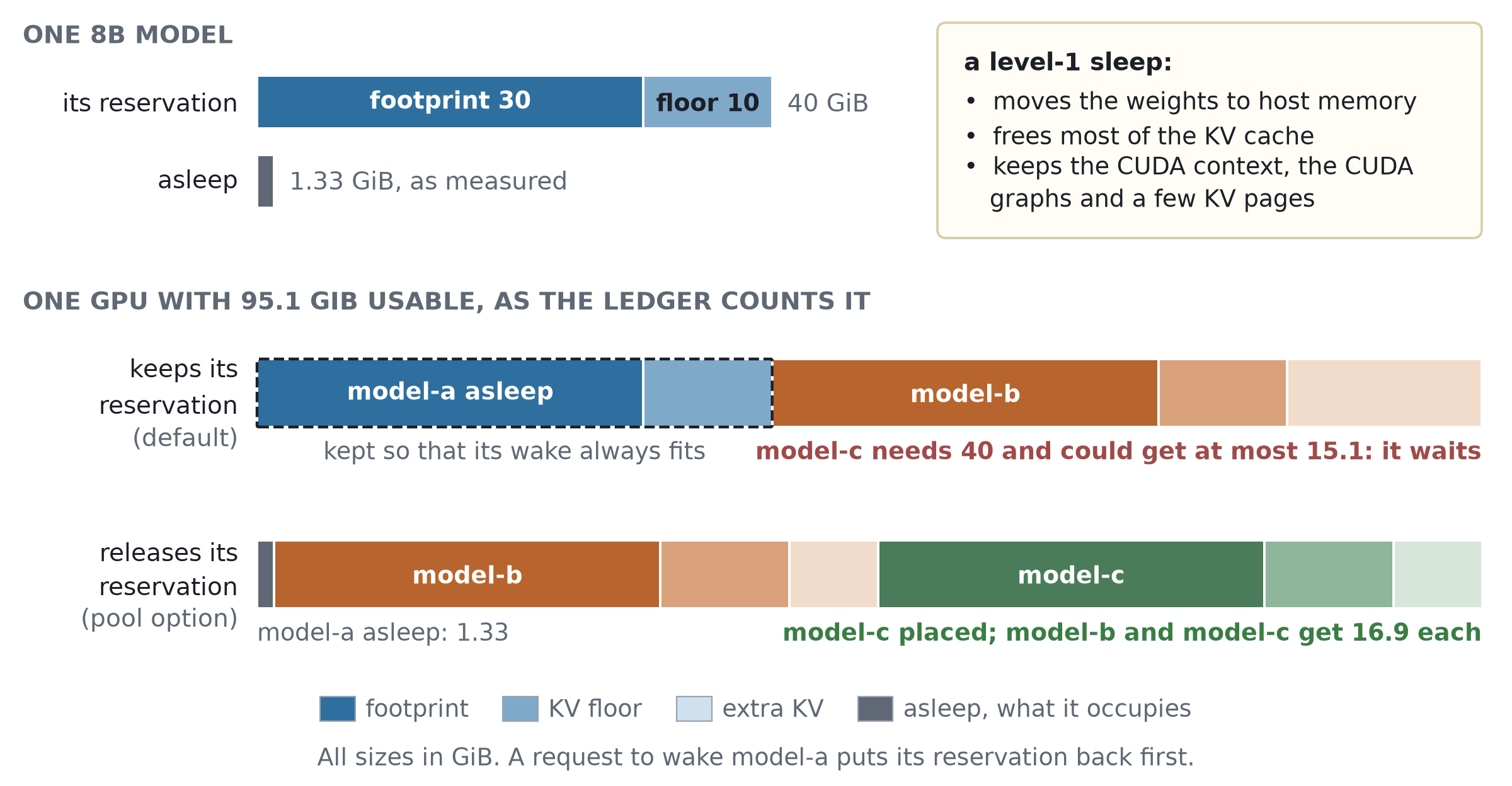
An idle model can sleep automatically. Once a model has been idle for the pool’s sleepAfterSeconds, the controller puts its engine into level 1 of vLLM’s sleep mode [2]. Level-1 sleep moves the weights to host memory and frees most of the KV cache. On the H20, sleeping 8B engines occupied between 1.0 and 1.3 GiB each, while each reservation was 40 GiB.
By default, a sleeping model keeps its whole reservation. It can then always wake, because no other model can take its place, but almost 39 GiB of the GPU stays idle while it sleeps. In the upper bar of the lower panel, model-c needs 40 GiB and finds only 15.1 GiB, although most of model-a’s reservation is not in use.
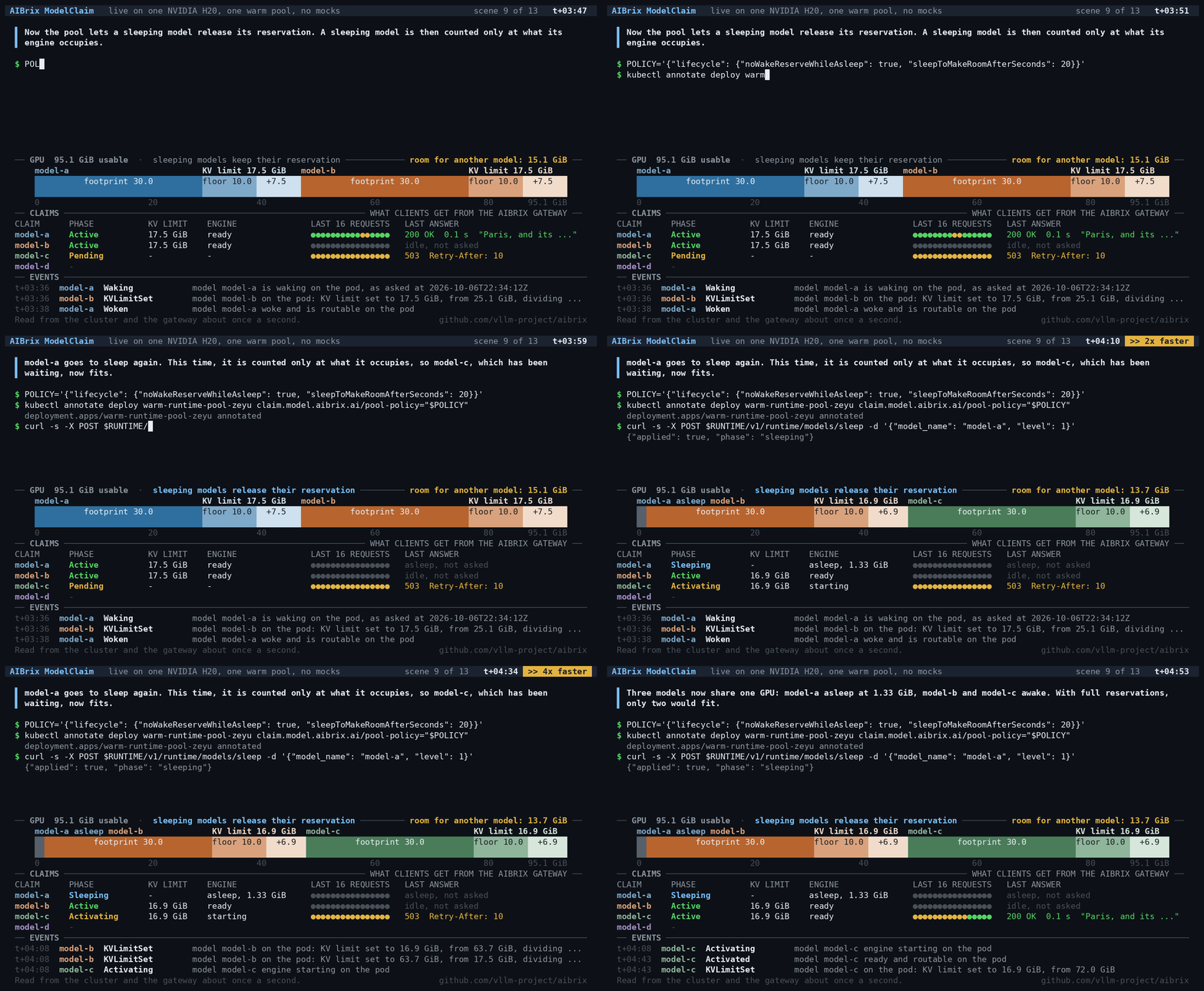
A pool can let sleeping models release their reservations instead, with noWakeReserveWhileAsleep. The ledger then counts a sleeping engine at only what it still occupies. In the lower bar, model-a is counted at 1.33 GiB, so model-c fits, and model-b and model-c get KV limits of 16.9 GiB each. Three 8B models now share a GPU that holds only two awake ones.
A model that released its memory must find room again before it wakes. A wake request puts its full reservation back in the ledger first, so no other model can take that room while the engine wakes.
Waking Through the Controller
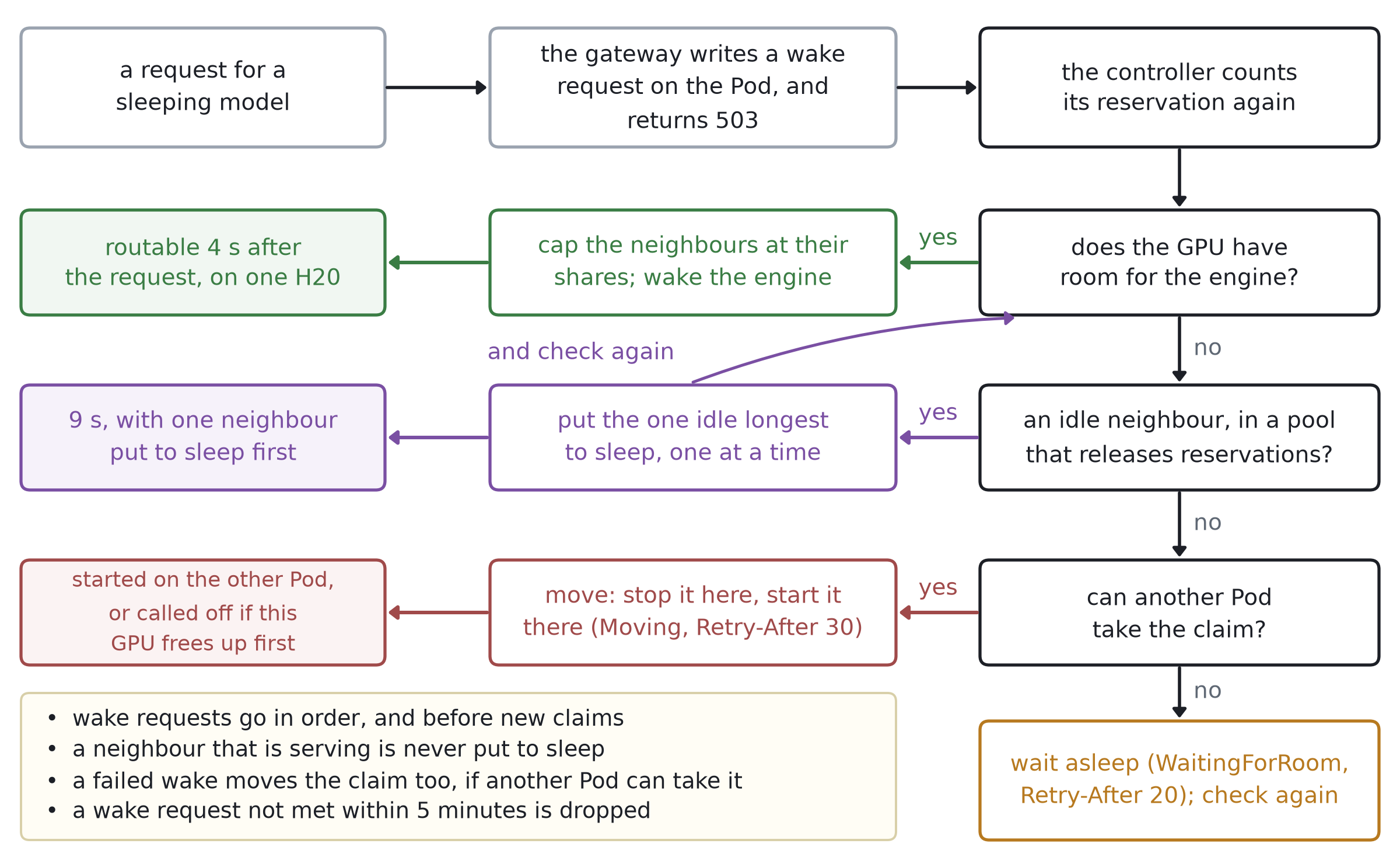
A request for a sleeping model does not wake it directly. The gateway asks the controller to wake the model and returns HTTP 503 with Retry-After, so the client retries later. The controller checks that the GPU can hold the engine, caps neighbouring engines at their assigned shares, and only then wakes the engine. On the H20, a model that had kept its reservation was routable 4 seconds after the request.
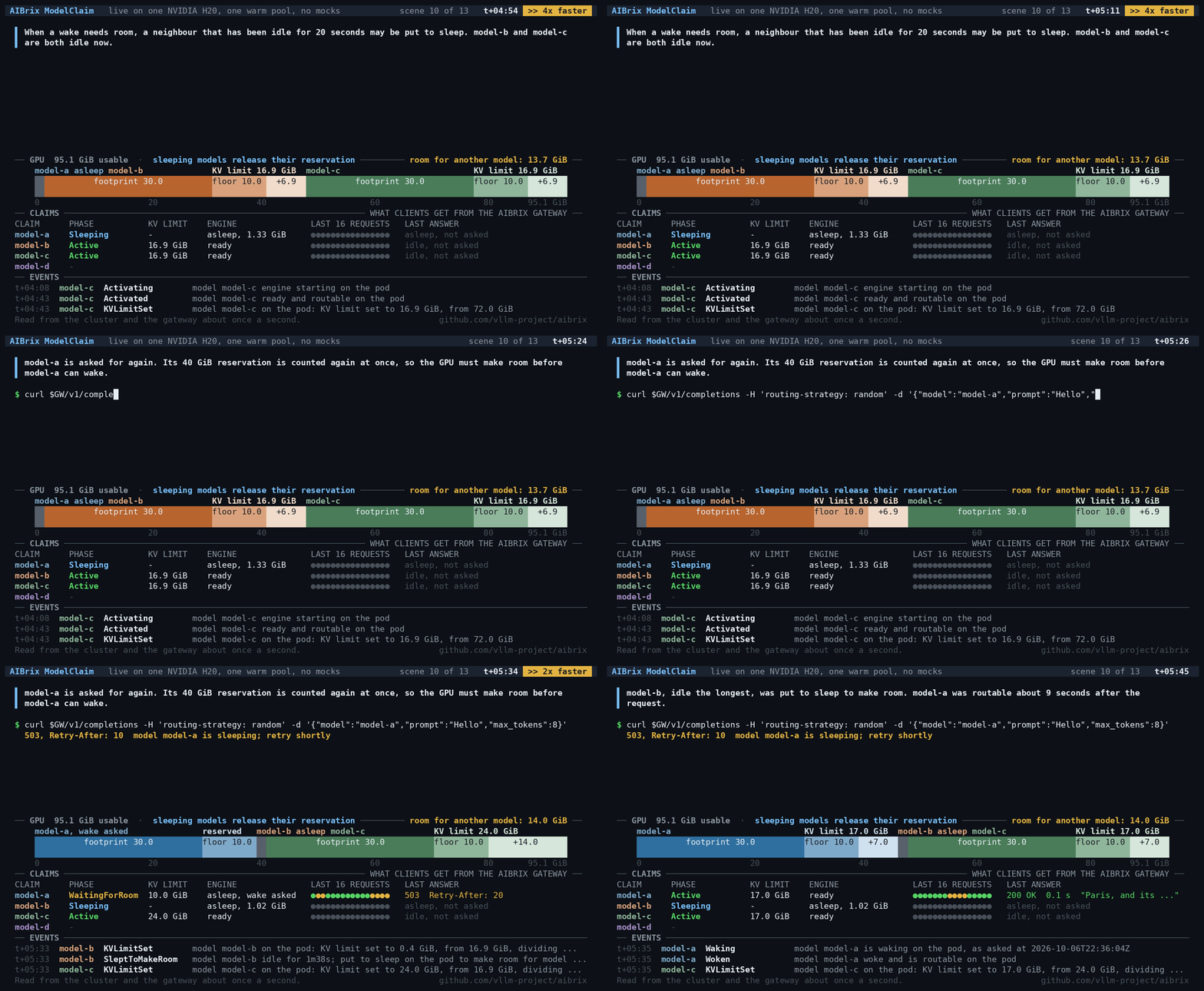
When the GPU has no room, the controller can make room if the pool allows sleeping models to release their reservations. It puts neighbouring models to sleep one at a time, starting with the one that has been idle longest, until the waking model fits. On the H20, the model was routable 9 seconds after the request, including the time to put one neighbour to sleep.
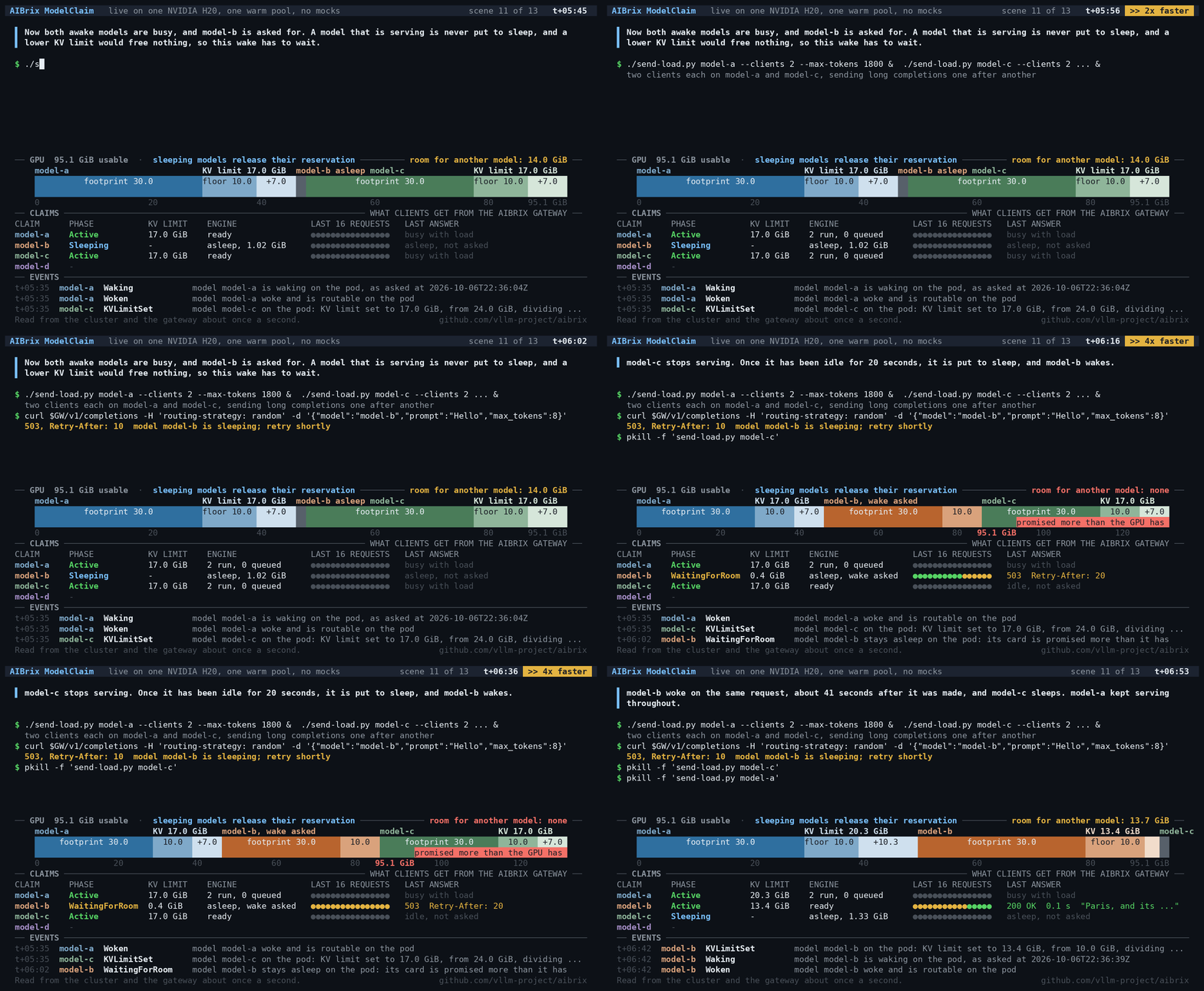
A neighbour that is serving requests is never put to sleep. If none can be put to sleep yet, the controller moves the claim to another Pod that can take it and starts its engine there. Without such a Pod, the wake waits, with the reason WaitingForRoom, until a neighbour has been idle long enough.
Making Room for a New Model
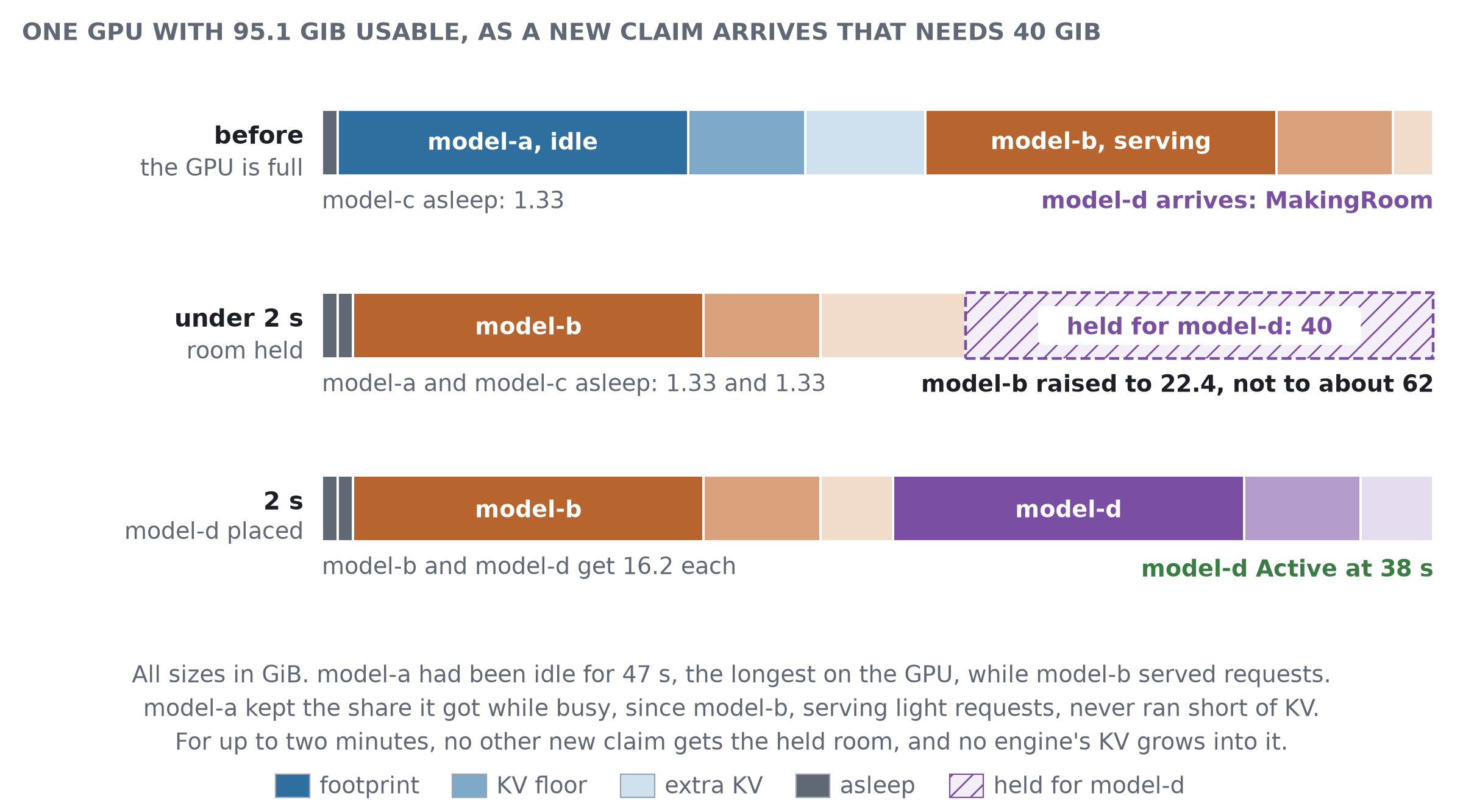
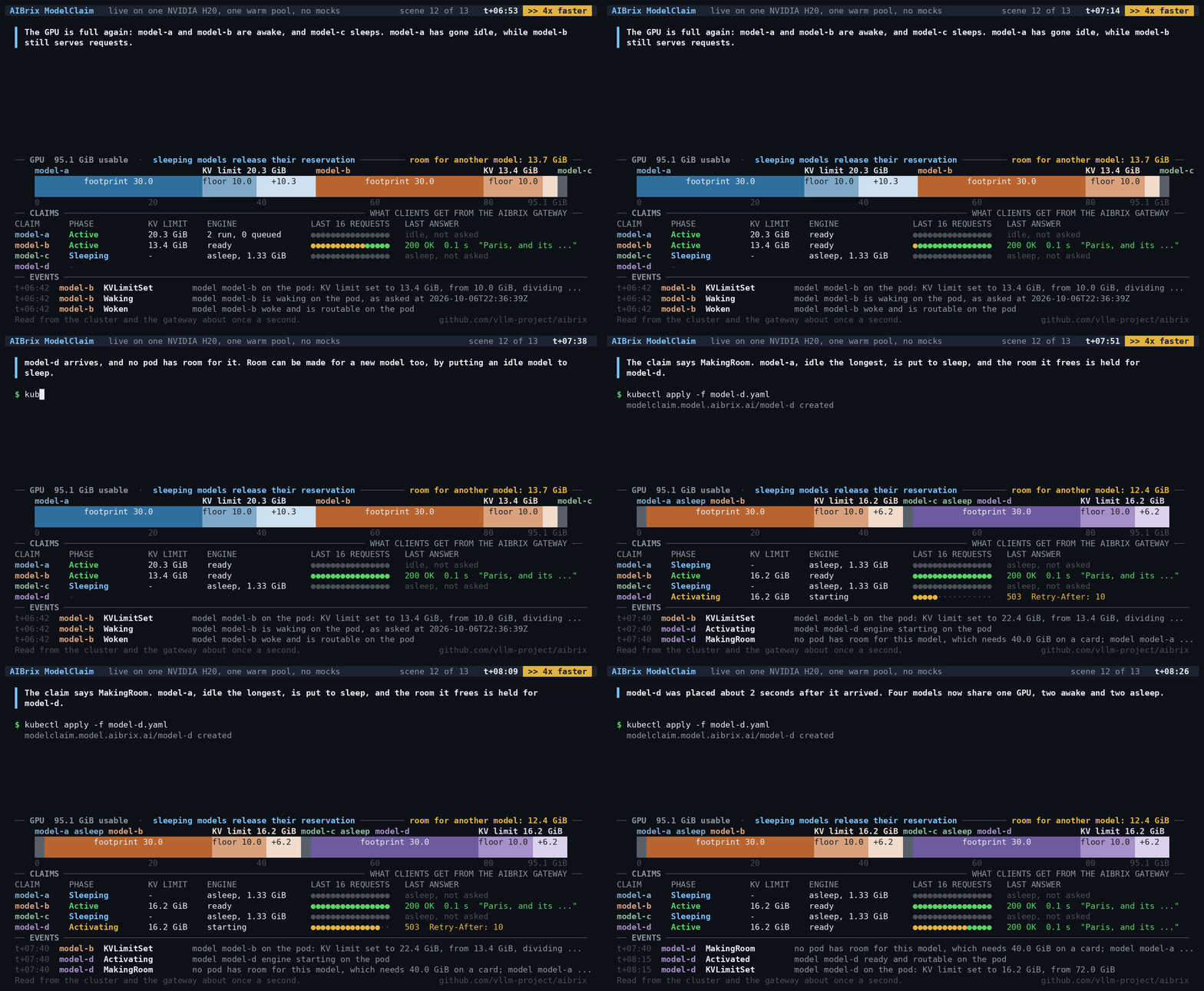
A new model can also find every GPU full. In a pool whose sleeping models release their reservations, the controller makes room for it the same way, by putting idle models to sleep. The claim then says MakingRoom, and the controller holds the freed room for it. No other new claim can take that room, and a busy neighbour cannot grow into it.
The figure shows this on the H20. When model-d arrived, the controller put idle model-a to sleep at once and placed model-d 2 seconds later. The new model began serving requests 38 seconds after it arrived, once its engine had started.
What Clients See
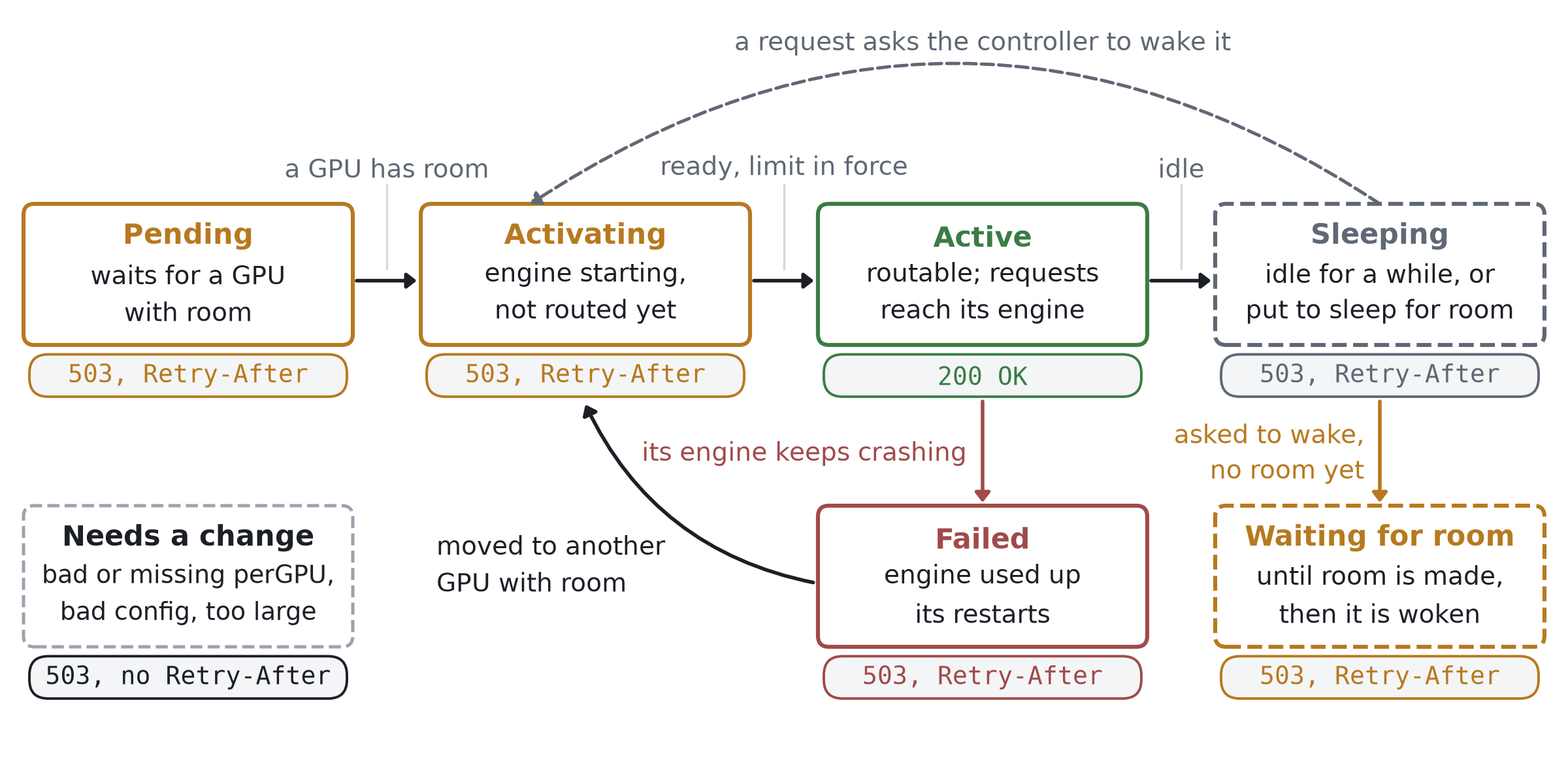
A model is routable only when its engine is ready and capped at its own KV limit. Routing requests to it earlier would let traffic push its memory use beyond its share. The same rule applies when a model wakes.
The gateway never holds a request while a model starts or wakes. It responds immediately, and the client retries. The table below lists the gateway’s response in each state.
| Model state | Gateway response |
|---|---|
| is routable | the request goes to its engine |
| is asleep, starting, or waking | 503, Retry-After: 10 |
| is not yet placed or has failed | 503, Retry-After: 10 |
| is waiting for room to wake or for room to be made for it | 503, Retry-After: 20 |
| is moving to another Pod | 503, Retry-After: 30 |
| requires a change or cannot fit on any GPU | 503, no Retry-After |
| is unknown to the gateway | 400 |
A 503 response includes the controller’s reason, when available, such as MakingRoom or WaitingForRoom.
Demo
The demo shows the run that the sections above describe: four claims of DeepSeek-R1-Distill-Llama-8B on one H20, recorded as they ran. It is cut into eight steps below, and each clip loops on its own. On the screen, a caption at the top says what is happening, and the commands follow. The GPU bar is the ledger, drawn in the same three shades as the figures, and the table under it shows each claim and the gateway responses its clients receive. Every number shown is read from the cluster or gateway in real time. Long waits, such as engine startup, are shown at a faster playback speed, as indicated in the header.
To keep the run short, the demo puts model-a to sleep by hand twice, in steps 4 and 5. A pool with an idle timeout in its policy would have done the same once the timeout had elapsed. The other sleeps are the controller’s own, and every wake starts with a client’s request.
1. Two models share a GPU. The controller places model-a, and its clients receive HTTP 503 with Retry-After until its engine is ready and capped. When model-b arrives, the controller lowers model-a’s KV limit first, and only then starts model-b. Each model keeps its floor, and the rest of the GPU is split evenly between them.
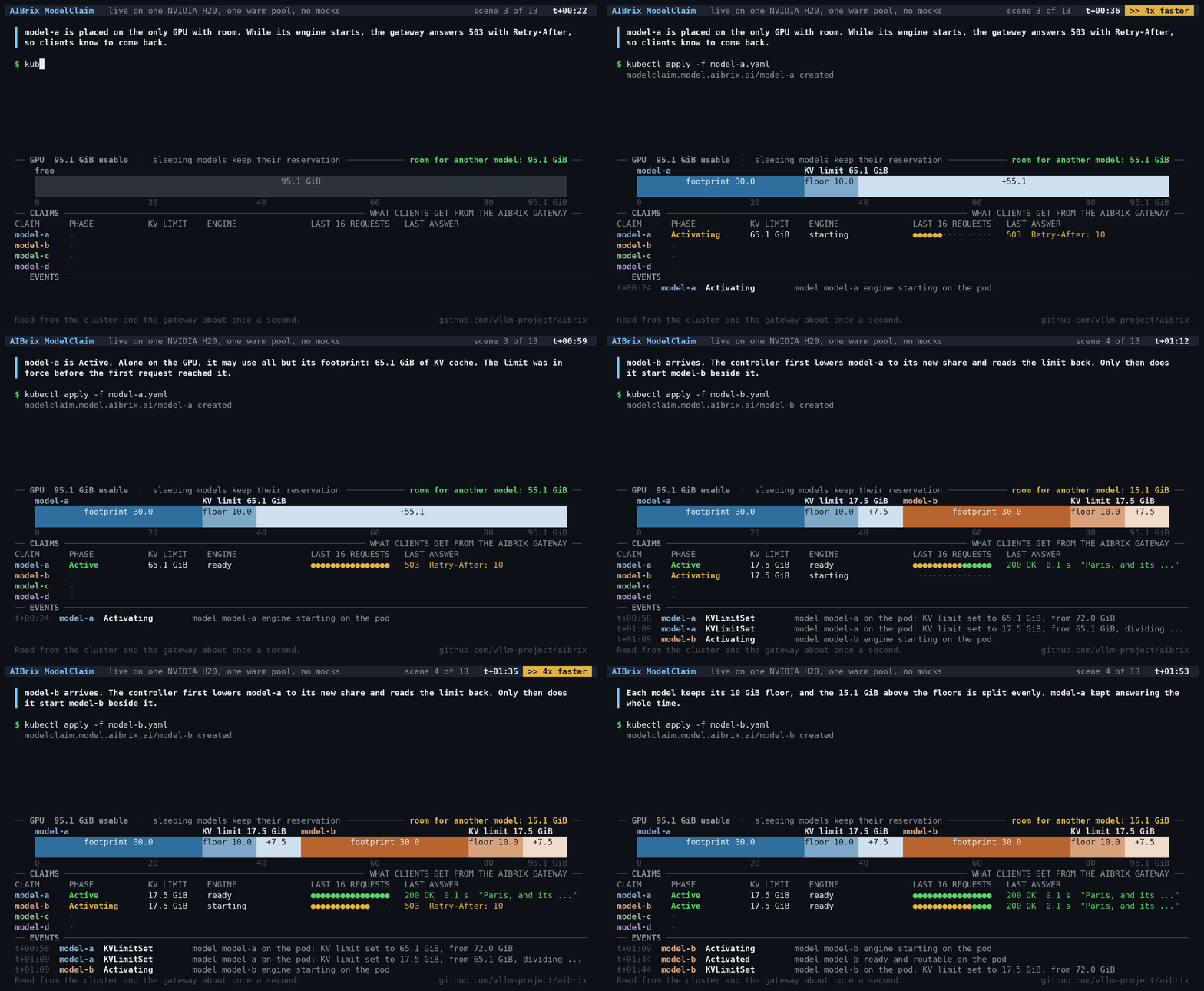
2. A model that does not fit waits. The model-c claim needs 40 GiB, more than the GPU could offer even with both models at their floors. It waits, its condition says why, and its clients receive HTTP 503 with Retry-After. A claim for 100 GiB is immediately marked as too large for any GPU.
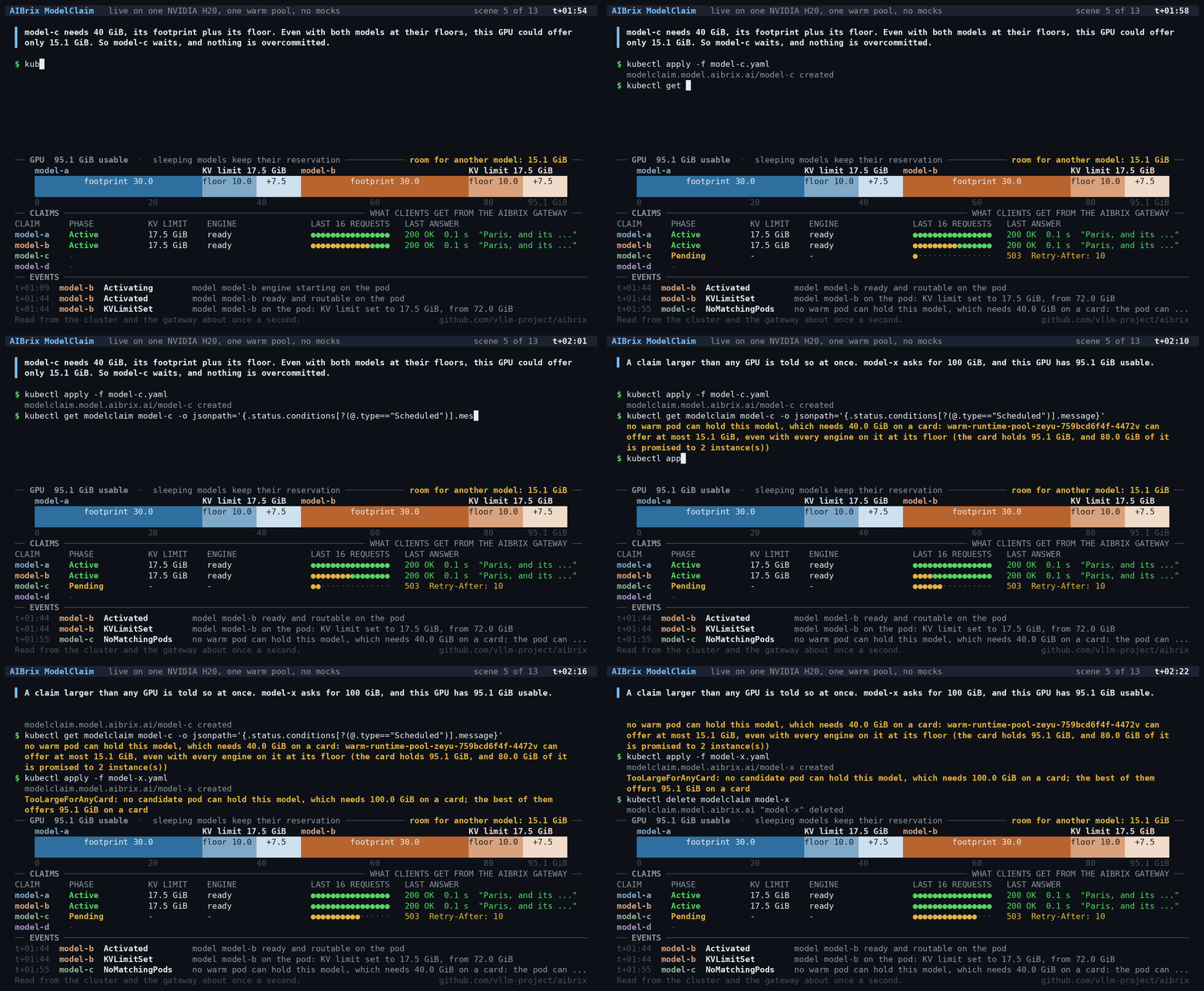
3. Extra KV follows load. Clients send model-a more requests than it can run at once. The model soon gets more of the GPU, while idle model-b keeps a little more than its floor. When the load stops, the allocation stays unchanged until a model runs short of KV memory or the set of models on the GPU changes.
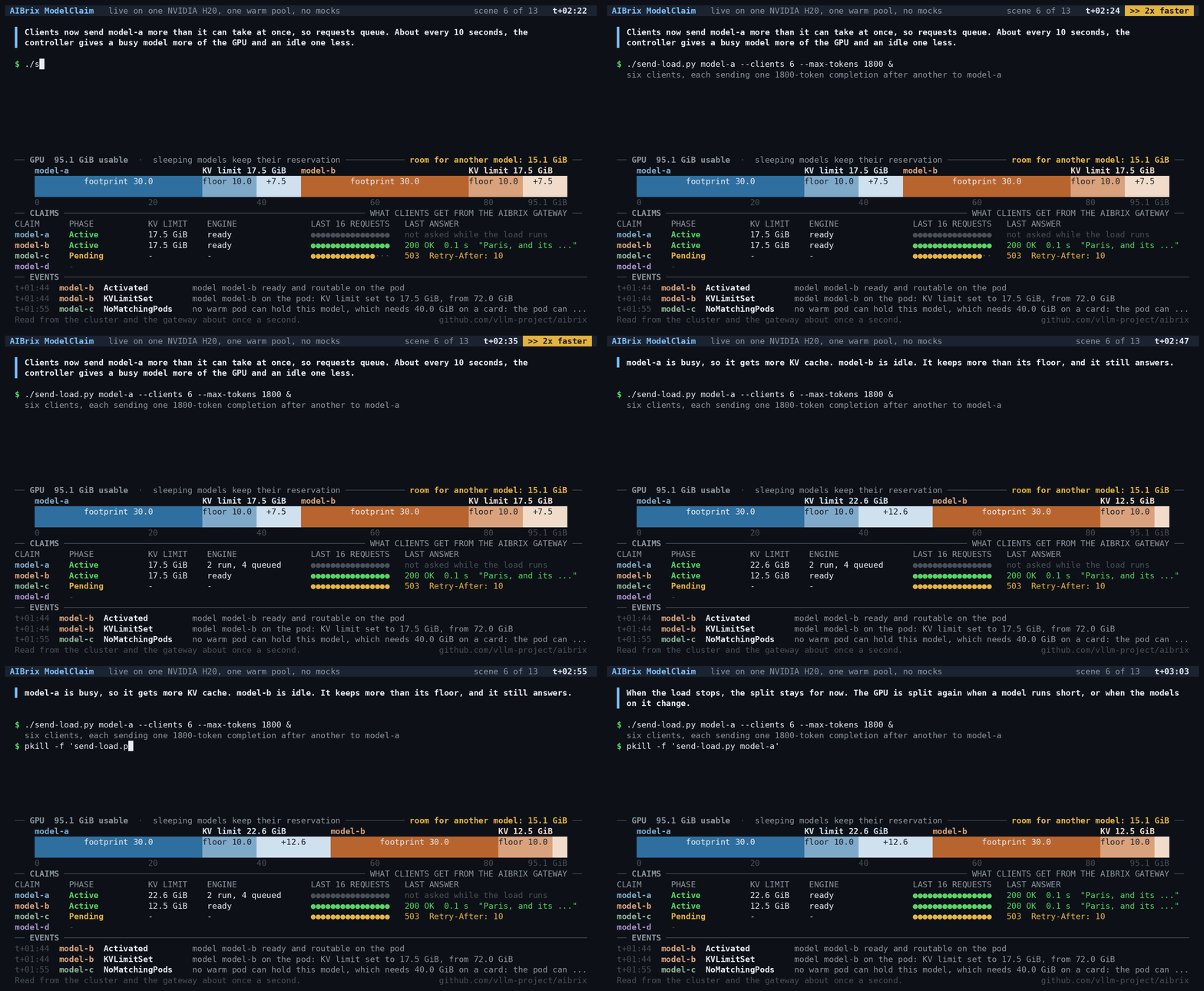
4. Sleeping while keeping the reservation. When model-a is put to sleep, its engine uses very little GPU memory, but its whole reservation stays in the ledger. The controller gives model-b the rest of the GPU, and model-c still waits. Then a client sends a request for model-a, and the controller wakes it.
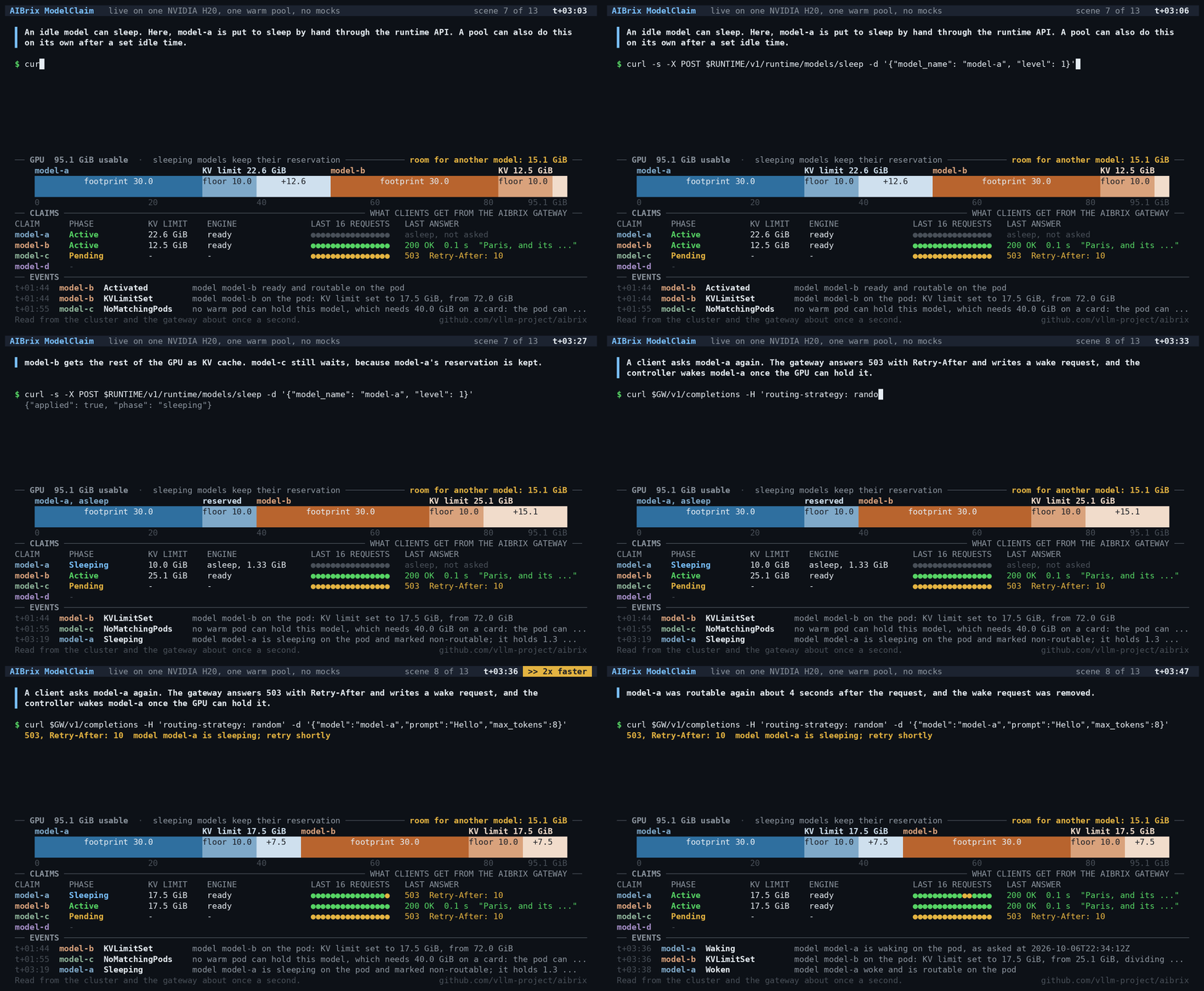
5. Sleeping models release their reservations. The pool now lets sleeping models release their reservations. When model-a sleeps again, the ledger counts only the memory it still occupies, so model-c fits. Three models share a GPU that holds only two awake ones.
6. Making room to wake a model. A client requests model-a again while model-b and model-c are idle. The ledger counts model-a’s whole reservation again at once. The controller then puts model-b, idle the longest, to sleep, and only then wakes model-a.
7. Waking a model alongside busy neighbours. A client requests model-b while model-a and model-c are serving, and neither of them is put to sleep. The ledger counts model-b’s reservation at once, so the bar shows more memory promised than the GPU has, but model-b’s engine stays asleep. Then the demo stops sending requests to model-c. Once model-c has been idle for 20 seconds, it is put to sleep, and model-b wakes.
8. Making room for a new model. A claim for model-d arrives when the GPU is full, while model-a is idle and model-b serves requests. The claim says MakingRoom. The controller puts model-a, which has been idle longest, to sleep, and the room it frees is held for model-d until model-d is placed.
The whole run is also available as a single video.
Try It
ModelClaim is experimental. The steps below use AIBrix v0.8.0, whose standard installation includes ModelClaim. They also use the runtime image aibrix/kvcached-runtime:6608436f37c8a936c53a6eb40b98982c7aeb9b06, which runs vLLM 0.30.0 and kvcached 0.1.6 on CUDA 13.0. The user guide [3] covers installation, configuration and failure handling. Once the control plane is installed, take the warm-pool sample from the v0.8.0 tag of the AIBrix repository, set its image to the runtime image above, and create the pool. For the H20 example below, set the sample’s Deployment name to warm-runtime-pool-h20 and use h20-pool-a consistently for its pool labels and selectors before applying it. These names are only labels, and the sample also runs on other NVIDIA GPUs:
kubectl apply -f samples/modelclaim/warm-runtime-pool.yaml
kubectl rollout status deployment/warm-runtime-pool-h20 --timeout=10m
Then create a ModelClaim for the pool. Save the following as qwen3.yaml:
apiVersion: model.aibrix.ai/v1alpha1
kind: ModelClaim
metadata:
  name: qwen3-0-6b
spec:
  modelName: qwen3-0.6b
  podSelector:
    matchLabels:
      claim.model.aibrix.ai/pool: h20-pool-a
  artifactURL: huggingface://Qwen/Qwen3-0.6B
  engine: vllm
  perGPU:
    maximumFootprint: 6Gi
    kvFloor: 1Gi
  engineConfig:
    args:
      --max-model-len: "2048"
Apply it, wait for it to become active, and inspect its status:
kubectl apply -f qwen3.yaml
kubectl wait --for=jsonpath='{.status.phase}'=Active modelclaim/qwen3-0-6b --timeout=15m
kubectl get modelclaim qwen3-0-6b -o jsonpath='{.status.instances}'
Each instance listed in the status includes its Pod, port, and KV limit in kvLimitBytes. With the gateway forwarded to localhost:8888 as the guide shows, send a request with the model name:
curl http://localhost:8888/v1/chat/completions \
  -H 'Content-Type: application/json' \
  -d '{"model": "qwen3-0.6b", "messages": [{"role": "user", "content": "Say hello."}]}'
To let idle models sleep and release their reservations, configure a policy for the pool:
kubectl annotate deployment warm-runtime-pool-h20 --overwrite \
  'claim.model.aibrix.ai/pool-policy={"lifecycle":{"sleepAfterSeconds":300,"noWakeReserveWhileAsleep":true,"sleepToMakeRoomAfterSeconds":30}}'
sleepAfterSeconds puts a model to sleep after five minutes of inactivity. noWakeReserveWhileAsleep lets a sleeping model release its reservation, and sleepToMakeRoomAfterSeconds sets how long a model must be idle before it may be put to sleep to make room. With this policy, the controller puts idle models to sleep on its own, and a request wakes each one when it arrives. Without sleepAfterSeconds, models sleep only to make room. These thresholds are configured manually for the whole pool; they are not yet tuned automatically based on traffic.
A few more things to keep in mind. Do not set --gpu-memory-utilization, since kvcached owns the KV cache. Measure the two perGPU figures on the GPU hardware used by the pool, rather than guessing them. And once a claim exists, only its perGPU settings can be changed. To change its model, its pool or its engine arguments, create a new claim.
What’s Next
The roadmap posted on RFC #2290 [4] includes:
- Start under the limit. Engines currently start under kvcached’s default limit and are capped before requests are routed to them. Starting each engine under its own limit requires support in kvcached.
- Per-GPU accounting in multi-GPU Pods. Keep a ledger for each GPU in the Pod, rather than sizing the Pod by its smallest GPU.
- KV in host memory. Offload KV to host memory.
- Priorities. Give each model a priority, with minimum and maximum KV allocations.
Two more limitations are worth noting. Choosing the pool’s sleep thresholds based on traffic, rather than by hand, is future work. And nothing yet tracks the host memory where sleeping models keep their weights, so a large number of sleeping models can exhaust it.
We would love to hear how ModelClaim works for your models. Issues and pull requests are welcome on GitHub.